Retro Recovery

Objective
| Difficulty | Description |
|---|---|
| 2/5 | Join Mark in the retro shop. Analyze his disk image for a blast from the retro past and recover some classic treasures. |
Mark DeVito mission statement
I am an avid collector of things of the past. I love old technology. I love how it connects us to the past. Some remind me of my dad, who was an engineer on the Apollo 11 mission and helped develop the rendezvous and altimeter radar on the space craft.
If you ever get into collecting things like vintage computers, here is a tip. Never forget to remove the RIFA capacitors from vintage computer power supplies when restoring a system. If not they can pop and fill the room with nasty smoke.
I love vintage computing, it’s the very core of where and when it all began. I still enjoy writing programs in BASIC and have started re-learning Apple II assembly language. I started writing code in 1982 on a Commodore CBM.
Sometimes it is the people no one can imagine anything of who do the things no one can imagine. - Alan Turing
You never forget your first 8-bit system.
There’s something in the works. Come see me later and we’ll talk.
While Kevin and I were cleaning up the Retro Store, we found this FAT12 floppy disk image, must have been under this arcade machine for years. These disks were the heart of machines like the Commodore 64. I am so glad you can still mount them on a modern PC.
When I was a kid we shared warez by hiding things as deleted files.
I remember writing programs in BASIC. So much fun! My favorite was Star Trek.
The beauty of file systems is that ‘deleted’ doesn’t always mean gone forever.
Ready to dive into some digital archaeology and see what secrets this old disk is hiding?
Go to Items in your badge, download the floppy disk image, and see what you can find!
Solution
This objective introduces basic digital forensics by focusing on disk image analysis and data recovery. By examining legacy storage artifacts, the task highlights how deleted or hidden data can often be recovered, reinforcing the importance of understanding file systems, residual data, and historical computing environments in forensic investigations.
Identify the Filesystem Format
Command
file floppy.imgWhat the command does
file inspects the binary header of a file and determines its type based on internal signatures. For disk images, this reveals the boot sector format, the filesystem, and other metadata. This is the quickest way to understand what you’re working with before attempting any forensic recovery.
Output
floppy.img: DOS/MBR boot sector, code offset 0x3c+2, OEM-ID "mkfs.fat", root entries 224, sectors 2880 (volumes <=32 MB), sectors/FAT 9, sectors/track 18, reserved 0x1, serial number 0x9c01e8ae, unlabeled, FAT (12 bit), followed by FATWhy this output matters
This confirms the disk is a 1.44MB FAT12 floppy image, which aligns perfectly with the retro-computing context. FAT12 is simple, and deleted file recovery works reliably—exactly what the challenge hints suggested.
Scan for Embedded Data or Hidden Binaries
Command
binwalk floppy.imgWhat the command does
binwalk scans a binary file for recognizable signatures (compressed files, strings, executables, archives, etc.). This helps determine whether the hidden content is embedded somewhere outside the filesystem.
Output
DECIMAL       HEXADECIMAL     DESCRIPTION
--------------------------------------------------------------------------------
133776        0x20A90         Copyright string: "Copyright Microsoft Corporation 1982-1988."
143535        0x230AF         Copyright string: "Copyright (C) Microsoft Corp 1982-1987. All rights reserved."
222225        0x36411         Copyright string: "Copyright Microsoft Corporation, 1982-1988."
258196        0x3F094         Copyright string: "Copyright (C) Microsoft Corp 1983-1988.  %s."
327297        0x4FE81         Copyright string: "Copyright (C) Microsoft Corp 1983-1988.  %s."
343826        0x53F12         Copyright string: "Copyright (C) Microsoft Corp 1983-1988.  All rights reserved."
614815        0x9619F         Copyright string: "Copyright Microsoft Corporation, 1985-1988."
Why this output matters
The scan shows only DOS copyright strings. No hidden archives or payloads exist in raw sectors. This strongly suggests the hidden clue is inside the filesystem, not outside it.
Examine the FAT12 Filesystem Structure
Command
fsstat floppy.imgWhat the command does
fsstat (Sleuth Kit) prints a complete map of the filesystem: FAT offsets, root directory location, cluster sizes, and layout. This is vital for knowing where deleted files live and how to extract them.
Output
FILE SYSTEM INFORMATION
--------------------------------------------
File System Type: FAT12

OEM Name: mkfs.fat
Volume ID: 0x9c01e8ae
Volume Label (Boot Sector): NO NAME
Volume Label (Root Directory):
File System Type Label: FAT12

Sectors before file system: 0

File System Layout (in sectors)
Total Range: 0 - 2879
* Reserved: 0 - 0
** Boot Sector: 0
* FAT 0: 1 - 9
* FAT 1: 10 - 18
* Data Area: 19 - 2879
** Root Directory: 19 - 32
** Cluster Area: 33 - 2879

METADATA INFORMATION
--------------------------------------------
Range: 2 - 45782
Root Directory: 2

CONTENT INFORMATION
--------------------------------------------
Sector Size: 512
Cluster Size: 512
Total Cluster Range: 2 - 2848

FAT CONTENTS (in sectors)
--------------------------------------------
93-93 (1) -> EOF
94-284 (191) -> EOF
285-436 (152) -> EOF
437-506 (70) -> EOF
507-642 (136) -> EOF
643-671 (29) -> EOF
672-690 (19) -> EOF
691-1235 (545) -> EOF
1236-1236 (1) -> EOF
Why this output matters
The root directory only covers sectors 19–32, so deleted file entries will be easy to enumerate. Cluster size is 512 bytes, making carving straightforward.
List Everything in the Filesystem (Including Deleted Markers)
Command
fls -r floppy.imgWhat the command does
fls lists files inside the filesystem.
- The
-rflag prints them recursively. - Deleted entries appear with an asterisk
*.
Output
r/r * 6:        all_i-want_for_christmas.bas
d/d 8:          qb45
+ r/r 1189:     BC.EXE
+ r/r 1190:     BRUN45.EXE
+ r/r 1191:     LIB.EXE
+ r/r 1192:     LINK.EXE
+ r/r 1193:     MOUSE.COM
+ r/r 1196:     PACKING.LST.txt
+ r/r 1197:     QB.EXE
+ r/r 1198:     QB.INI
r/r * 10:       .all_i-want_f
v/v 45779:      $MBR
v/v 45780:      $FAT1
v/v 45781:      $FAT2
V/V 45782:      $OrphanFiles
Why this output matters
Two deleted files jump out:
all_i-want_for_christmas.bas.all_i-want_f
Both are likely hiding the challenge solution.
List Only Deleted Files
Command
fls -rd floppy.imgWhat the command does
Adds -d, which filters to show deleted entries only.
This clarifies which files require recovery.
Output
r/r * 6:        all_i-want_for_christmas.bas
r/r * 10:       .all_i-want_f
Why this output matters
These are the only two deleted files. This matches the retro computing hint about “hiding things as deleted files”.
Recover the Deleted Files
Commands
icat floppy.img 6 > all_i-want_for_christmas.bas
icat floppy.img 10 > all_i-want_f
What the commands do
icat extracts file content directly from its inode/record number, independent of whether it is deleted.
This avoids relying on the operating system and ensures a clean carve from disk clusters.
Why this matters
Now we can analyze the contents of the hidden files.
Inspect the Small Deleted File
Command
strings all_i-want_fWhat the command does
strings prints printable ASCII sequences.
Useful for scanning binary or partially overwritten files for readable content.
Output
b0nano 7.2
mark
arcade
all_i-want_for_christmas.bas
Why this output matters
The content is minimal, but it directly references the BASIC program.
This hints that the real clue is inside all_i-want_for_christmas.bas.
Inspect the Large BASIC Program
Command
strings all_i-want_for_christmas.basWhat the command does
Shows all readable strings in the recovered BASIC file, which appears to be a Star Trek-style text game.
Relevant Output
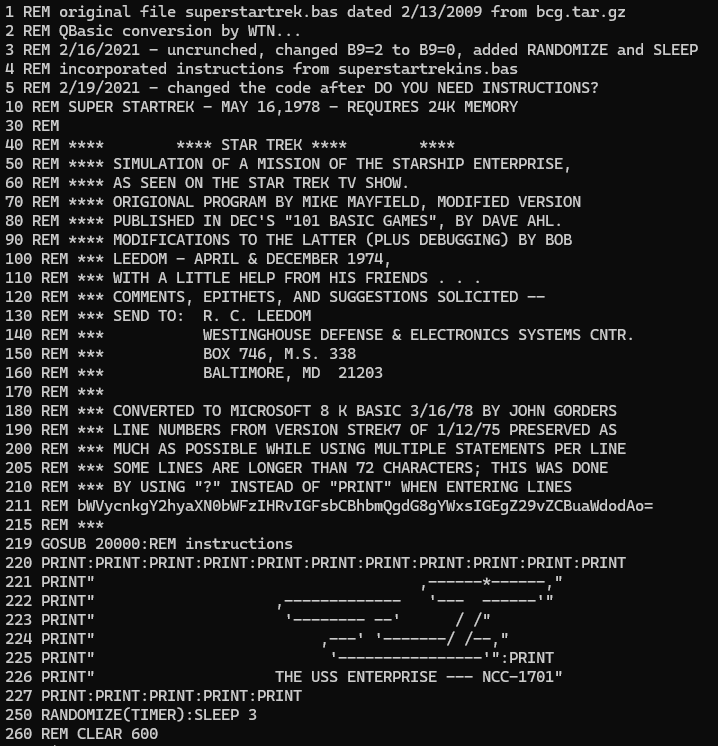
A full Star Trek BASIC program appears, and inside it is a Base64-encoded line (line 211).
Why this output matters
The encoded string is clearly placed as a hidden message embedded in the program. This is the actual target of the challenge.
Decode the Hidden Base64 Payload
Command
echo "bWVycnkgY2hyaXN0bWFzIHRvIGFsbCBhbmQgdG8gYWxsIGEgZ29vZCBuaWdodAo=" | base64 -dWhat the command does
Decodes Base64 into plain text.
Output
merry christmas to all and to all a good nightWhy this output matters
This is the exact hidden message embedded in the recovered program. It serves as the challenge solution / flag.
Final Flag
merry christmas to all and to all a good night
This objective reinforces foundational forensic concepts by demonstrating how data remnants can persist on disk even after deletion. By recovering and decoding legacy artifacts, the task illustrates how historical file systems and simple encoding techniques can still reveal meaningful information during an investigation.
Mark DeVito closing words
After solving, Mark says:
Excellent work! You’ve successfully recovered that deleted file and decoded the hidden message.
Sometimes the old ways are the best ways. Vintage file systems never truly forget what they’ve seen. Play some Star Trek… it actually works.