Spare Key

Objective
| Difficulty | Description |
|---|---|
| 1/5 | Help Goose Barry near the pond identify which identity has been granted excessive Owner permissions at the subscription level, violating the principle of least privilege. |
Goose Barry mission statement
You want me to say what exactly? Do I really look like someone who says MOOO?
The Neighborhood HOA hosts a static website on Azure Storage.
An admin accidentally uploaded an infrastructure config file that contains a long-lived SAS token.
Use Azure CLI to find the leak and report exactly where it lives.
Spare Key Terminal
This objective focuses on identifying exposed credentials within cloud infrastructure. By investigating configuration artifacts hosted on Azure Storage, the task highlights how long-lived access tokens and misplaced secrets can introduce security risk when stored in publicly accessible locations.

Listing all resource groups
Prototype command:
az group list -o table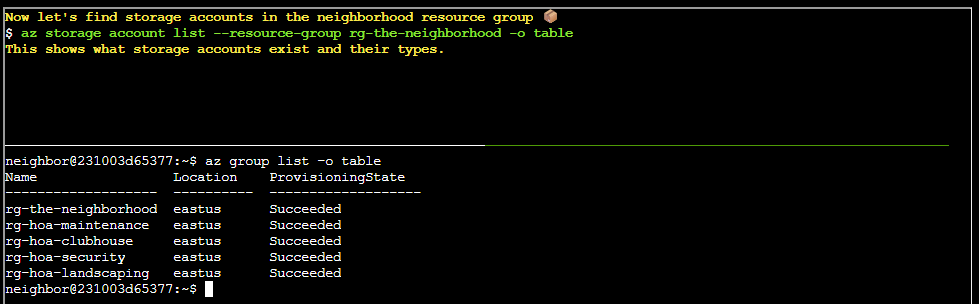
Finding storage accounts
Prototype command:
az storage account list --resource-group rg-the-neighborhood -o table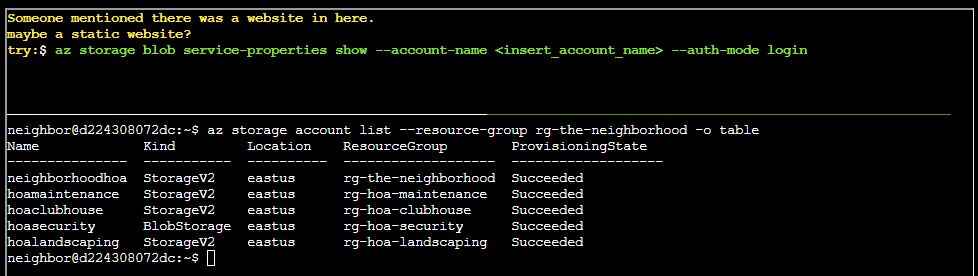
Finding a website
Prototype command:
az storage blob service-properties show --account-name <insert_account_name> --auth-mode login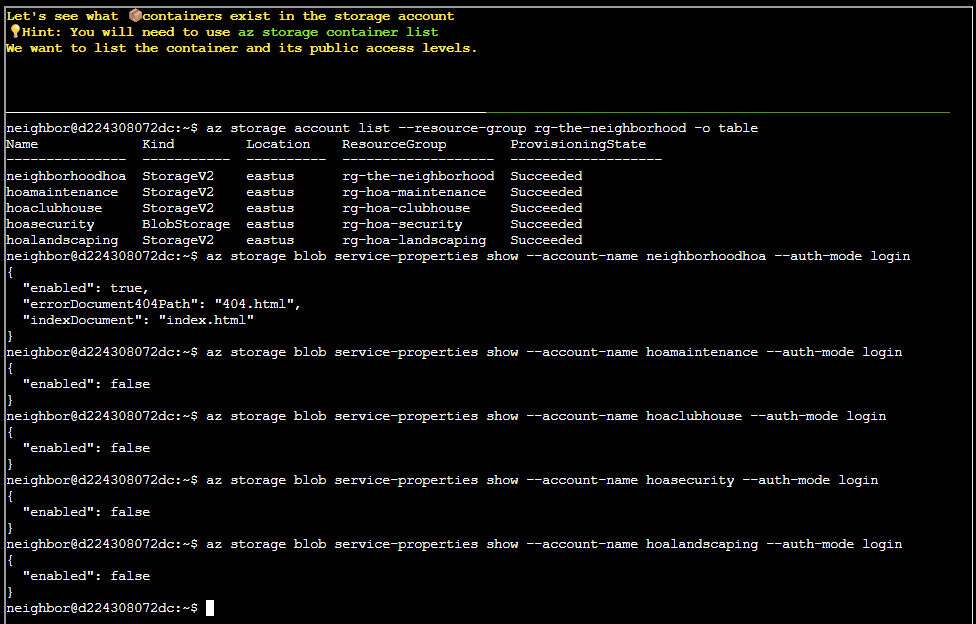
There is a website in storage account neighboorhoodhoa
neighbor@d224308072dc:~$ az storage blob service-properties show --account-name neighborhoodhoa --auth-mode login
{
  "enabled": true,
  "errorDocument404Path": "404.html",
  "indexDocument": "index.html"
}
Finding containers
Prototype command:
az storage container listThis command isn’t enough and we have to extend it arguments. Luckily, we can just look at the previous command and add the arguments --account-name and --auth-mode - like so:
az storage container list --account-name neighborhoodhoa --auth-mode login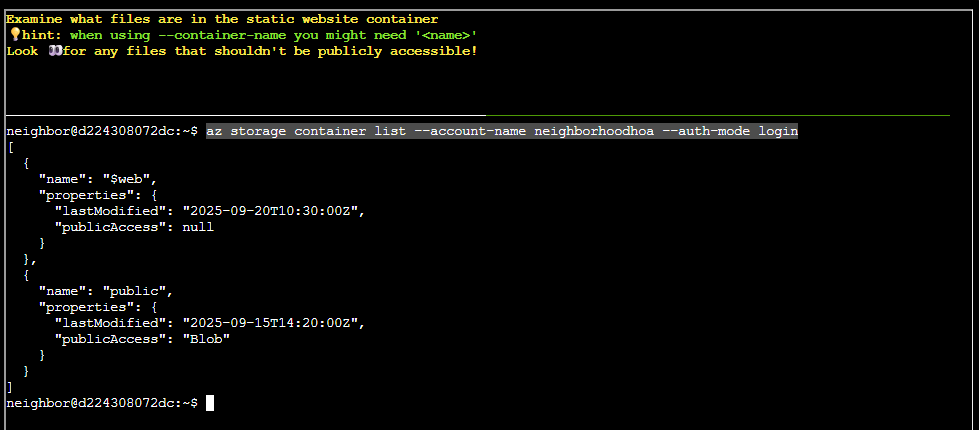
Examining files in static website container
In this excersice we are not given a prototype command, however we are provided with the following hint:
when using --container-name you might need '<name>'However, by applying some forward thinking we can easily whip up a command following the query language logic - like so:
az storage blob list --container-name '$web' --account-name neighborhoodhoa --auth-mode login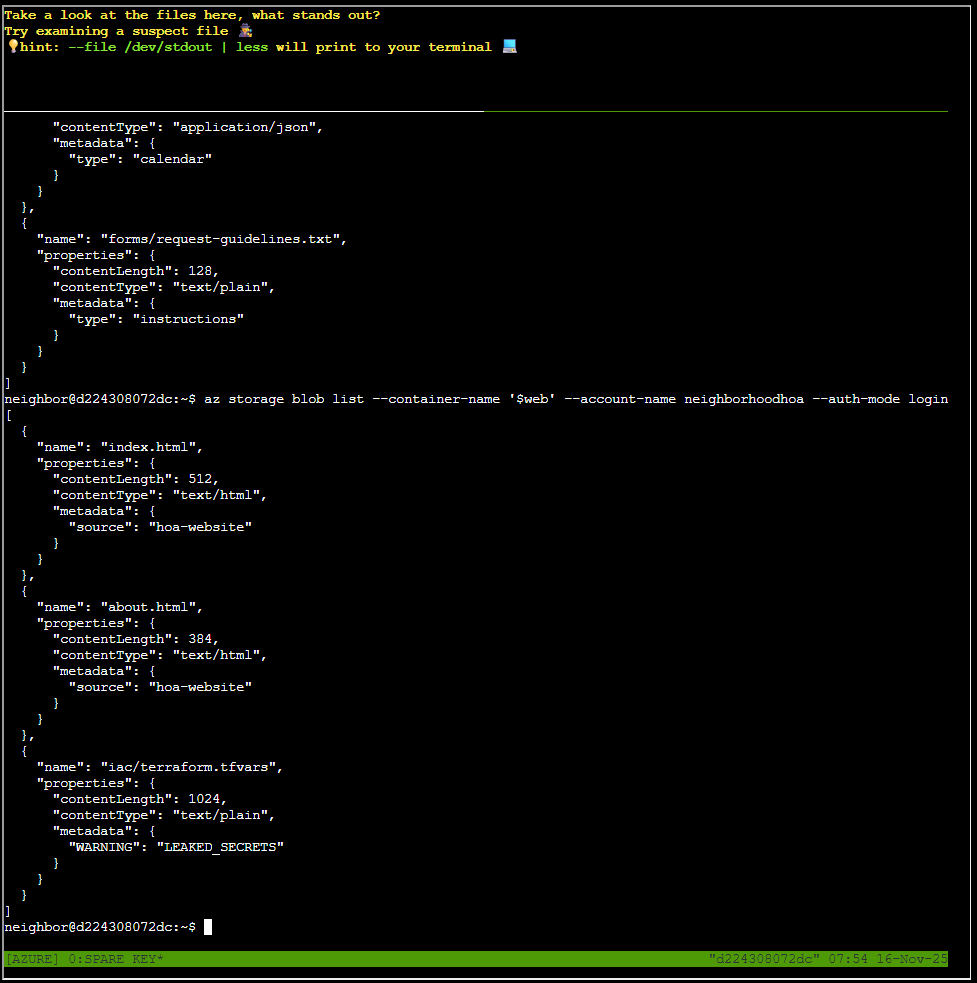
Looking at files
Yet again we are not presented with a prototype command, but rather with a hint:
hint: --file /dev/stdout | less will print to your terminalBy applying the same logic as previous and consulting ChatGPT, I ended up with this command to list a file:
az storage blob download --container-name '$web' --account-name neighborhoodhoa --auth-modelo
gin --name 'iac/terraform.tfvars' --file /dev/stdout | less
The content of the file is:
# Terraform Variables for HOA Website Deployment
# Application: Neighborhood HOA Service Request Portal
# Environment: Production
# Last Updated: 2025-09-20
# DO NOT COMMIT TO PUBLIC REPOS

# === Application Configuration ===
app_name = "hoa-service-portal"
app_version = "2.1.4"
environment = "production"

# === Database Configuration ===
database_server = "sql-neighborhoodhoa.database.windows.net"
database_name = "hoa_requests"
database_username = "hoa_app_user"
# Using Key Vault reference for security
database_password_vault_ref = "@Microsoft.KeyVault(SecretUri=https://kv-neighborhoodhoa-prod.vault.azure.net/secrets/db-password/)"

# === Storage Configuration for File Uploads ===
storage_account = "neighborhoodhoa"
uploads_container = "resident-uploads"
documents_container = "hoa-documents"

# TEMPORARY: Direct storage access for migration script
# WARNING: Remove after data migration to new storage account
# This SAS token provides full access - HIGHLY SENSITIVE!
migration_sas_token = "sv=2023-11-03&ss=b&srt=co&sp=rlacwdx&se=2100-01-01T00:00:00Z&spr=https&sig=1djO1Q%2Bv0wIh7mYi3n%2F7r1d%2F9u9H%2F5%2BQxw8o2i9QMQc%3D"

# === Email Service Configuration ===
# Using Key Vault for sensitive email credentials
sendgrid_api_key_vault_ref = "@Microsoft.KeyVault(SecretUri=https://kv-neighborhoodhoa-prod.vault.azure.net/secrets/sendgrid-key/)"
from_email = "noreply@theneighborhood.com"
admin_email = "admin@theneighborhood.com"

# === Application Settings ===
session_timeout_minutes = 60
max_file_upload_mb = 10
allowed_file_types = ["pdf", "jpg", "jpeg", "png", "doc", "docx"]

# === Feature Flags ===
enable_online_payments = true
enable_maintenance_requests = true
enable_document_portal = false
enable_resident_directory = true

# === API Keys (Key Vault References) ===
maps_api_key_vault_ref = "@Microsoft.KeyVault(SecretUri=https://kv-neighborhoodhoa-prod.vault.azure.net/secrets/maps-api-key/)"
weather_api_key_vault_ref = "@Microsoft.KeyVault(SecretUri=https://kv-neighborhoodhoa-prod.vault.azure.net/secrets/wea
ther-api-key/)"

# === Notification Settings (Key Vault References) ===
sms_service_vault_ref = "@Microsoft.KeyVault(SecretUri=https://kv-neighborhoodhoa-prod.vault.azure.net/secrets/sms-cre
dentials/)"
notification_webhook_vault_ref = "@Microsoft.KeyVault(SecretUri=https://kv-neighborhoodhoa-prod.vault.azure.net/secret
s/slack-webhook/)"

# === Deployment Configuration ===
deploy_static_files_to_cdn = true
cdn_profile = "hoa-cdn-prod"
cache_duration_hours = 24

# Backup schedule
backup_frequency = "daily"
backup_retention_days = 30
{
  "downloaded": true,
  "file": "/dev/stdout"
}
Goose Barry closing words
After solving, Barry says:
There it is. A SAS token with read-write-delete permissions, publicly accessible. At least someone around here knows how to do a proper security audit.