Intro to Nmap

Objective
| Difficulty | Description |
|---|---|
| 1/5 | Meet Eric in the hotel parking lot for Nmap know-how and scanning secrets. Help him connect to the wardriving rig on his motorcycle! |
Eric Pursley mission statement
Hey, I’m Eric. As you can see, I’m an avid motorcyclist. And I love traveling the world with my wife.
I enjoy being creative and making things. For example, a cybersecurity tool called Zero-E that I’m quite proud of, and the Baldur’s Gate 3 mod called Manaflare. I’m even in the BG3 credits!
I also make tools, ranges, and HHC worlds for Counter Hack. Yup, including the one you’re in right now.
But most of the time, I’m helping organizations in the real world be more secure. I do a bunch of different kinds of pentesting, but speciailize in network and physical.
Some advice: stay laser-focused on your goals and don’t let the distractions life throws at you lead you astray. That’s how I ended up at Counter Hack!
Speaking of tools, let me introduce you to one of the most essential weapons in any pentester’s arsenal: Nmap.
It’s like having X-ray vision for networks, and I’ve set up a perfect environment for you to learn the fundamentals.
Help me find and connect to the wardriving rig’s service on my motorcycle!
Intro top Nmap terminal
This objective serves as an introduction to active network reconnaissance using Nmap. Rather than focusing on advanced scanning techniques, the challenge emphasizes the role of discovery and enumeration as foundational steps in understanding a networked environment.
By interacting with Nmap in a controlled setting, I am reminded that effective analysis begins with visibility: identifying what systems are present, which services are exposed, and how a target responds to probing. This shift from passive observation to deliberate interaction marks an important transition in the overall challenge flow.
The objective sets the stage for later exercises by reinforcing that accurate reconnaissance is a prerequisite for meaningful assessment, exploitation, or defense.
This terminal starts with a simple welcome screen:

Task 1 - scan top 1000 ports
When run without any options, nmap performs a TCP port scan of the top 1000 ports. Run a default scan of
127.0.12.25and see which port is open.
For this we use just use the following command:
nmap 127.0.12.25Task 1 screen:

Task 1 results:
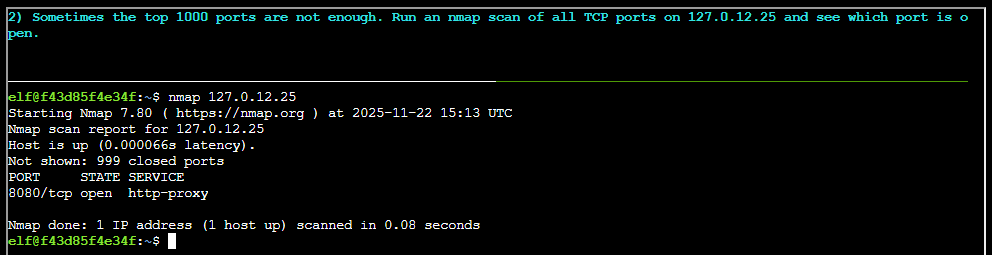
The scan revealed that port TCP/8080 is open.
Task 2 - Scan all ports
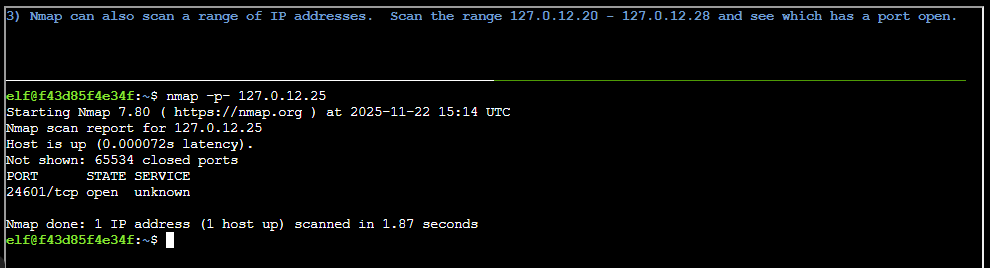
Sometimes the top 1000 ports are not enough. Run an nmap scan of all TCP ports on 127.0.12.25 and see which port is open.
If we use the ports switch for namep, -p, and add a -, we instruct Nmap to scan all ports. The command will then be:
nmap -p- 127.0.12.25Scan results:
Task 3 - Scan a range
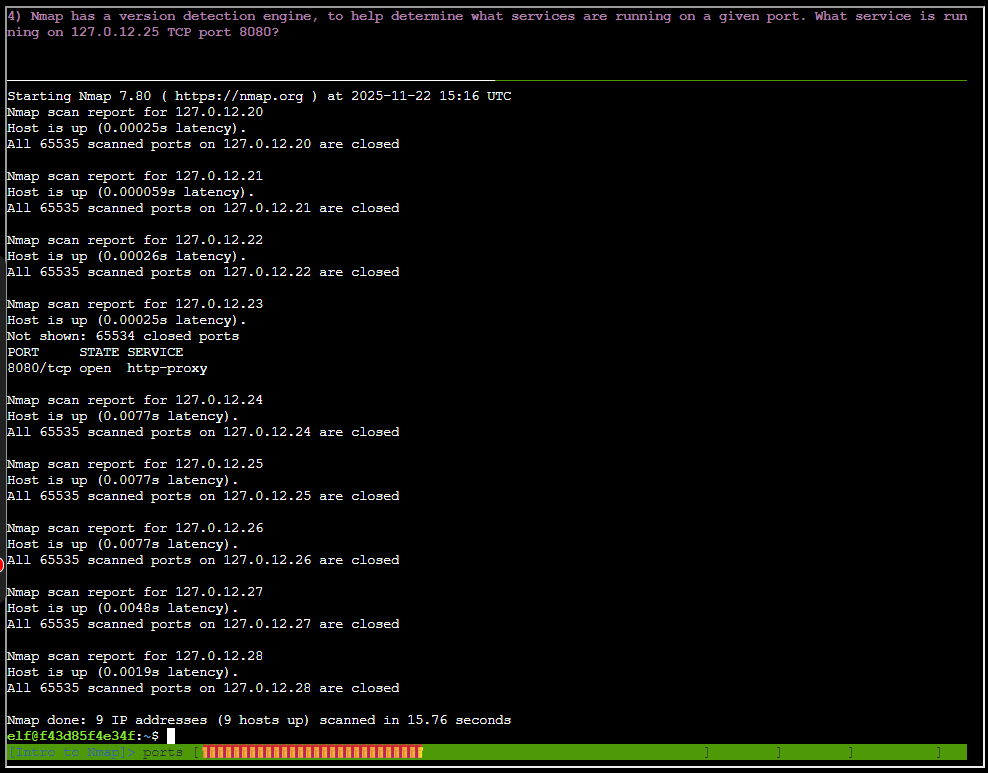
Nmap can also scan a range of IP addresses- Scan the range 127.0.12.20 - 127.0.12.28 and see which has a port open.
To scan a range we can define a range like so, using the scan all ports option in addition:
nmap -p- 127.0.12-20-28Scan results:
Task 4 - Version scanning
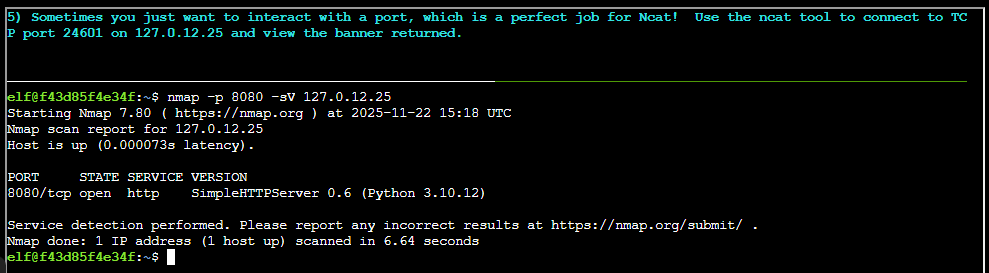
Nmap has a version detection engine, to help determine waht services are running on a given port. What services is running on 127.0.12.25?
The service version scan option is called -sV, we can use it like so:
nmap -p 8080 -sV 127.0.12.25Results version scanning:
Task 5 - interacting with a port
Sometimes you want to interact with a port. which is a perfect job for Netcat! Use the ncat tool to connect to TCP port 24601 on 127.0.12.25 and view the banner returned
Ncat is a common tool we often use in pentests and threat hunting. Its standard use follows this format nc <ip> <port>, it defaults to use TCP. We use the following command:
nc 127.0.12.25 24601
This objective reinforces that understanding a network starts with discovery, not assumptions.
Eric Pursley closing words
After solving, Eric says:
Excellent work! You’ve got the Nmap fundamentals down - that X-ray vision is going to serve you well in future challenges.
Now you’re ready to scan networks like a seasoned pentester!